Instagram DM Updates New Features You Need to Know
Stay connected like never before with the latest Instagram DM updates! Discover new features that make messaging faster, more interactive, and seamless. From enhanced group chats to fun reactions, explore how these updates elevate your conversations.
It is becoming increasingly common for users to quit posting to the main feed and engage in private chats instead.
In the first place, Instagram has added message editing, which allows you to update your direct message for up to 15 minutes after it has been sent.
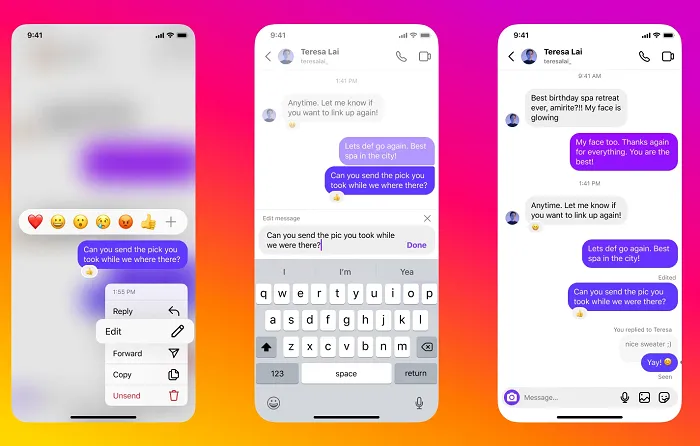
As WhatsApp added the same feature last year, it makes sense for Meta to implement feature parity across its messaging tools as part of its broader vision of merging them into one platform.
Edit Sent Messages: Say Goodbye to Typos
We’ve all been there. You send a message in a hurry, only to spot a glaring typo moments later. Previously, your only options were to send a follow up correction or delete the message entirely. With one of the most anticipated Instagram DM updates, you can now edit messages up to 15 minutes after sending them.
This feature brings Instagram DMs in line with other popular messaging apps, offering a much needed layer of flexibility. To edit a message, simply press and hold on the sent message, and a menu will appear. Tap “Edit,” make your changes, and you’re done. The message will display an “Edited” tag, so others in the chat know a change was made.
Why This Matters
- Clarity: Correcting typos or rephrasing a sentence ensures your message is understood as intended.
- Professionalism: For brands and creators using DMs for business, this feature helps maintain a polished and professional image.
- Convenience: It’s a simple, intuitive solution that saves you from the awkwardness of sending multiple correction messages.
Pin Your Favorite Chats to the Top
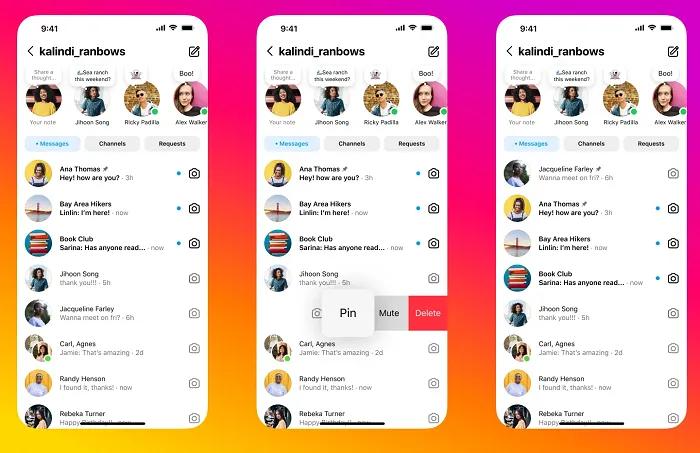
Do you have a few go to chats you access constantly? Whether it’s your best friend, a family group, or a key business contact, scrolling through a long list of DMs to find them can be a hassle. The new “Pin Chat” feature solves this problem.
You can now pin up to three of your most important individual or group chats to the top of your inbox. Pinned conversations will remain at the top, giving you instant access without the need to search or scroll. To pin a chat, swipe left on the conversation in your inbox and tap “Pin.” To unpin it, simply repeat the process.
Benefits of Pinning Chats
- Efficiency: Save time by having your most frequent conversations readily available.
- Organization: Keep your inbox tidy and prioritize the people and groups that matter most.
- Never Miss a Message: Pinned chats are easier to spot, reducing the chance you’ll miss an important update.
How to Get the Latest Instagram DM Updates
To start using these enhanced messaging tools, the first step is to ensure your Instagram app is updated to the latest version. Head to the App Store (for iOS) or Google Play Store (for Android) and check for any available updates.
Once your app is up to date, these new features should automatically become available. If you don’t see them right away, don’t worry. Instagram often rolls out updates in phases, so it might take a few days to reach all users.
Start Exploring the New DM Features
The latest Instagram DM updates are more than just minor tweaks; they represent a significant step forward in making the platform a more versatile and user friendly communication tool. From the practical ability to edit messages to the organizational power of pinning chats, these new Instagram features empower you to connect more effectively.
Top DM Chats
Up to three DM chats can now be pinned to the top of an Instagram user’s inbox, allowing them to easily access their most important conversations.
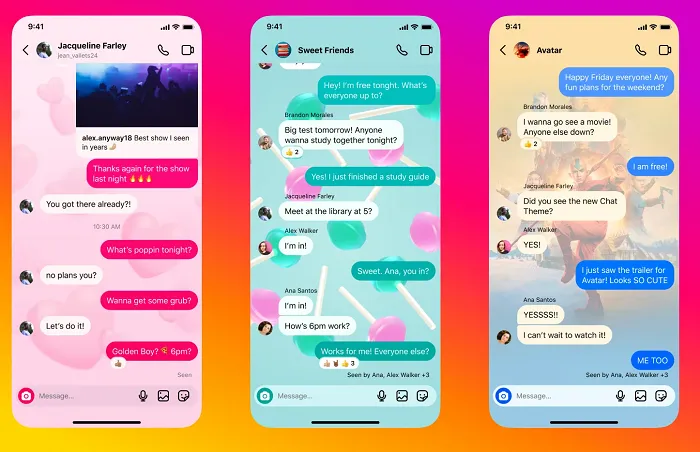
The company has also added new chat themes to customize your engagement, and you can now turn on read receipts in all DM chats or in specific threads.
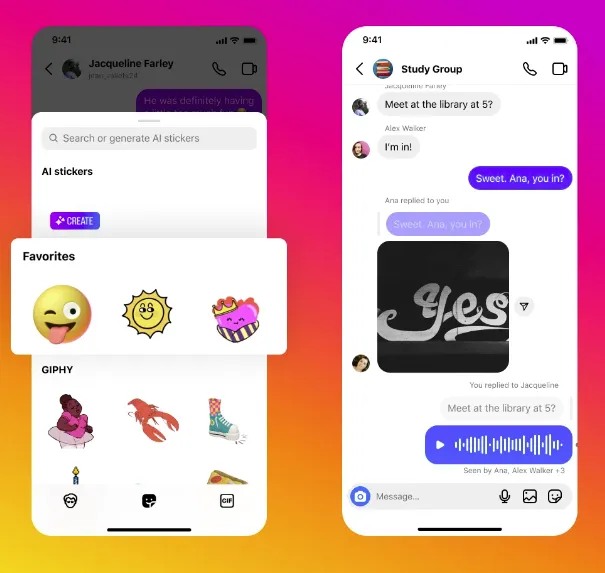
Additionally, Instagram added a new feature that lets you save your favorite stickers in the app, which keeps them at the top of the sticker tray so you can add them to your DMs more easily.
Instagram is evolving as user behavior shifts, with DMs now the primary engagement channel over Stories or the main feed. CEO Adam Mosseri highlights that more photos and videos are shared in DMs daily than anywhere else on the platform. The main feed, now driven by AI recommendations, mirrors TikTok’s entertainment-focused approach, with 40% of content discovered via AI, boosting usage by 6%. To strengthen personal connections, Instagram is enhancing Direct Messages, making following profiles less central to the user experience. Stay updated on Instagram’s algorithm driven engagement trends.
Frequently Asked Questions
What is the new message update on Instagram?
Reply to DMs while you scroll: Previously, if you got a DM, you had to jump off the Feed or Explore page and reply in the DMs. Now, a new Instagram feature allows you to quickly reply when a DM notification pops up. No need to lose your place in the Feed!
What is the new DM on Instagram?
Instagram’s new feature protects users from unwanted images …
The new DM feature joins Instagram’s existing restrictions that are designed to protect users from abuse and unwanted contact. The app has a “Hidden Words” setting where DM requests containing offensive words, phrases and emojis are automatically sent to a hidden folder.
Why i don t have update messaging on Instagram?
#Fix 1: Update the Instagram App
The first way to fix Instagram update messaging not showing is to update your Instagram app because an update might fix some in app bugs or the newest version may include the Messenger feature available to you.
How do you update direct messages on Instagram?
- Edit a message you’ve sent on Instagram
- From your conversation, tap and hold a message you’ve recently sent.
- Tap Edit. Note: You may no longer see this option if it’s past the time limit.
- Update the text of your message.
- When you’re ready, tap to update your message in the chat.
When you message someone on Instagram can they see your profile?
No if your profile is private then he/she won’t be able to see your profile if you just accept the message request. No matter what unless you have your instagram profile on private then they can see your profile and everything. The only thing is that you will be able to see their and message them.
Conclusion
The shift is fundamental. User-driven social platforms, like Meta’s apps, have always relied on users to self-select their experiences through profiles. Using algorithmic sorting, social apps are now seeing greater engagement gains and showing you more content from profiles similar to your own.
The main feed has become an entertainment source, with messages now serving as the “social” element.
Taking a look at things from a completely different perspective is something you should factor into your social media marketing strategy.